


Doodle Magic: Glow Art Drawing
4.3172.00 Reviews
App Specs
- Version
- 1.1.24
- Updated On
- License
- Free
- Downloads
- 1,000,000+
- Developer
- CEM SOFTWARE LTD
- Categories
- Art & Design
- Platform
- Android, iOS
Screenshots
 Analysis by AppCompare
Ever had one of those days where you just want to doodle away into a world of imagination, but paper and pen just don't cut it? Enter Magic Doodle: Glow Art Drawing, a quirky little app that’s got your back when the creative juices are flowing, and you need a canvas that lights up your ideas—literally.
That glowing look is the point here, not a substitute for a full digital illustration studio. I find it most useful when I want a quick visual idea to feel lively without building it up through layers, detailed shading, or a long setup. A few bright marks can turn a simple shape into something playful, which makes this a different kind of drawing experience from the more traditional art apps I’d reach for when precision matters.
Why the glow changes a quick sketch
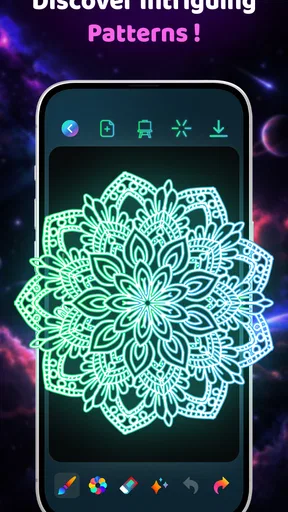
Glow effects have a practical effect on how a doodle reads: they make individual lines feel like the subject rather than merely its outline. That suits stars, loops, bursts, symbols, and loose patterns especially well. I’d start with a simple silhouette and let the luminous strokes provide the visual interest, rather than trying to add detail everywhere. This keeps a small design readable and prevents the page from becoming a jumble of competing marks.
That approach is also handy when I’m short on time. If I have a minute while waiting for a friend, I can sketch a few curved lines or a little made-up emblem and get a finished-looking result without committing to a serious drawing session. It is the kind of casual creative break that works on a phone because the idea can be small and the effect does much of the decorating.
A quick workflow that keeps the drawing clear
I’d treat each doodle as a compact composition: begin with the main shape, leave a little breathing room around it, then add only a few supporting marks. With luminous colors, every extra stroke attracts attention. Resisting the urge to fill the whole canvas can make the finished image feel more intentional, especially if the subject is a greeting, a symbol, or a simple abstract pattern.
Undo and redo make experimenting less risky, but I still find it useful to pause before adding another flourish. A practical habit is to test a new direction with one or two strokes, then decide whether it helps the focal shape. If it doesn’t, undoing it is easier than trying to rescue an overworked doodle. This is a small workflow choice, but it matters more in a glow-focused app because bright lines can quickly dominate the image.
For a personal digital card, I’d keep the message short and build the drawing around one recognizable motif. A glowing heart, star, or abstract border can add warmth without making the card hard to read. That is a better fit for this style than trying to create a dense invitation or a carefully typeset design; the app’s appeal is the handmade, luminous touch, not formal page layout.
Worth Reading Before You Choose

EA SPORTS FC Mobile 26 Is a Bigger Football Game, but It Takes Time

Flipboard Shows What News Apps Must Do Beyond the Feed

Switching to Android Auto Means Rethinking Your Driving Routine

Google Calendar Makes a Crowded Week Easier to Manage

Ludo King Makes the Most of the Minutes Between Plans

Baby Panda World Brings Quick Play to Modern Phones, but Its Game Library Feels Busy
Getting Started with a Splash
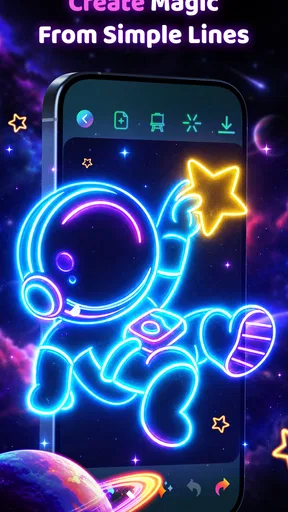
So, diving right into the app, the first thing that hits you is the vibrant, neon-like interface that just screams creativity. It's like stepping into a digital art studio where the lights are always on. The app is super user-friendly, so even if you’re someone who's all thumbs with tech, you’ll find navigating through Magic Doodle: Glow Art Drawing as easy as pie.
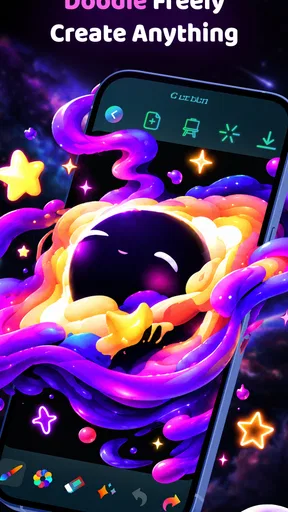
Once you're in, you’ll notice a variety of brushes and colors to play with. The color palette isn’t just your usual red, blue, and yellow; it’s like having a rainbow at your fingertips. You can literally paint with light, and the effects are as magical as it sounds. The glow effect really amps up the art, making even the simplest doodles look like they belong in a gallery.
It helps to think of the brush and color choices as ways to establish mood, not as a checklist to use all at once. For a calmer result, I’d stick to a small number of colors and repeat a few shapes; for a louder, more playful sketch, I’d mix up the marks while keeping one clear subject. This is a useful distinction if you’re making something to send to a friend: a restrained drawing often communicates better on a small screen than a busy one.
Features That Spark Joy
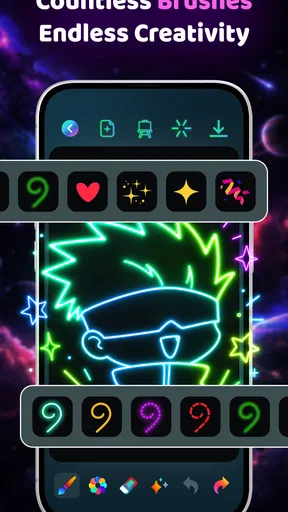
Now, let's talk features. One of the coolest things about this app is the variety of brush styles. Whether you’re into abstract art or just want to draw some funky patterns, you’ve got brushes that mimic everything from neon lights to sparkles. It’s like being handed a magic wand and told, "Go wild!"
Another neat feature is the ability to undo and redo your strokes. Made a mistake? No biggie. Just tap undo, and it’s like it never happened. This feature is a lifesaver, especially when you’re experimenting with different styles and effects.
Plus, the app doesn’t just stop at drawing. You can even animate your doodles! Imagine a glowing star that twinkles or a wave that moves—it’s all possible here. This is where creativity really gets to shine, and trust me, it’s hard to stop once you get started.
Animation makes the app more appealing when the goal is a small moment of movement rather than a polished film. I’d use it to give a simple doodle a little extra personality, then keep the drawing uncluttered so the motion remains easy to notice. If you need precise timing, multiple scenes, or a more involved animation workflow, a dedicated animation tool is likely a better match; the draw-and-glow approach here is strongest for playful experiments.
Sharing Your Masterpieces
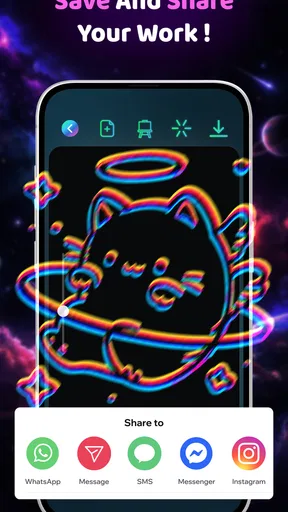
What good is creating art if you can’t show it off, right? Thankfully, Magic Doodle: Glow Art Drawing makes it super easy to share your creations. With just a few taps, you can share your artworks on social media or send them to friends. It’s a great way to show off your latest masterpiece or even just a fun way to say hi.
And here’s a little tip from me to you: try using the app to create personalized digital cards. With all the glowing effects, your cards will definitely stand out!
A realistic use for that is a quick birthday greeting or a cheerful message when a plain text feels a bit flat. I’d make the drawing first, check that the main lines still read clearly at phone size, and then share it with the person who will appreciate a handmade touch. For anything that needs exact typography, careful cropping, or a consistent professional brand style, I’d switch to a layout or illustration app designed around those jobs instead.
Who will enjoy this, and where it falls short
This is an Art & Design app from CEM SOFTWARE LTD, and its focused glow-drawing style makes it easiest to recommend to people who like casual sketching, decorative doodles, or making small, personal images. It is also a reasonable starting point for someone who feels intimidated by a blank canvas: the bright effect gives simple strokes a clear identity, so you do not need advanced drawing skills to make something cheerful.
I would be less likely to recommend it to someone who wants a serious replacement for a desktop art program, a precise diagram tool, or a full-featured design workspace. The neon look is distinctive, but that also narrows its range. If your usual work depends on exact shapes, detailed editing, print-ready layouts, or a broad set of professional controls, a conventional drawing or design app will serve you better. Here, the best results come from leaning into the playful visual style rather than asking it to behave like a different kind of tool.
It is free to download, with in-app purchases ranging from $1.99 to $19.99 per item. I’d begin with the free experience and decide whether the way you actually use the app makes any paid option worthwhile, rather than paying just because more choices are available. The app is rated for Everyone, which fits its accessible, casual drawing premise, though younger users should still have an adult help them make purchase decisions.
The app has a 4.4 average from around 33,000 ratings and has been installed over a million times. It was released on March 15, 2025, and version 1.1.20 requires Android 8.0 or later. Those details make it straightforward for many Android users to check compatibility, but the more important question for me is whether you want this particular luminous style; popularity cannot make it the right fit for someone who prefers natural brushes or restrained, realistic color.
Final Thoughts
So, here's the bottom line. If you’re looking for a fun way to unleash your creativity, or maybe just a new hobby to dive into, Magic Doodle: Glow Art Drawing is totally worth a download. It’s not just an app; it’s a canvas of endless possibilities. Whether you’re a seasoned artist or just someone who loves to doodle, this app will keep you entertained and inspired.
My recommendation is strongest for quick, expressive drawings, playful patterns, and personal messages where a glowing line is part of the charm. I’d choose another app when I need technical accuracy or more control over a finished design, but for a relaxed sketch made between everyday tasks, the directness is a real advantage. It is easy to try without turning a small creative urge into a project.
Why stick to the ordinary when you can create something extraordinary with a touch of glow? Go ahead, give it a try, and watch your imagination come to life in the most luminous way possible!
Pros
- Intuitive interface for easy use.
- Variety of brushes and effects.
- Supports multiple file formats.
- Great for all skill levels.
- No intrusive ads.
Cons
- Limited color palette.
- Requires internet for updates.
- Occasional lag on older devices.
- No layer feature available.
- In-app purchases can add up.
FAQs for Doodle Magic: Glow Art Drawing
What is Magic Doodle: Glow Art Drawing?
Magic Doodle: Glow Art Drawing is a creative app designed for artists of all ages. It allows users to create vibrant glow art using a variety of brushes and colors. The app offers an intuitive interface with tools to create stunning artwork that shines, perfect for both casual doodlers and serious artists.
What features does Magic Doodle offer?
Magic Doodle offers a variety of features including multiple brush styles, a wide color palette, and effects like neon glow and glitter. Users can save their creations, share them on social media, and even watch their drawings come to life with playback mode, making it a versatile app for creative expression.
Is Magic Doodle suitable for children?
Yes, Magic Doodle is suitable for children and encourages creativity and imagination. The app's user-friendly interface and engaging tools make it easy for kids to create glowing art. Parental controls can help manage screen time, ensuring a safe and fun experience for children.
Does Magic Doodle require an internet connection?
Magic Doodle does not require an internet connection for basic drawing and creating artwork. However, to access certain features like sharing your artwork on social media or downloading additional content, an internet connection may be necessary.
Are there any in-app purchases in Magic Doodle?
Magic Doodle is free to download, but it offers in-app purchases for additional features and content. Users can buy premium brushes, color packs, or unlock ad-free experiences. These purchases enhance the app’s functionality but are not required to enjoy its basic features.


